Features of the E School Management System project
We will implement the following feature in the ASP .NET E School Management System Project:
Schools need a software for managing students marks, attendance, reports..etc. Application like E school management system will handle all these tasks. This software developed on asp.net programming language.
Project Abstract:
This software application is designed in asp.net programming language using SQL Server database. When school takes admission to new member details of students with parents details are updated to database. For every students new user name and password with unique number is provided through which they can access account.
Using this software we can add attendance details, marks, fees, assignments, exam dates, time table.etc. Explanation of each module is given below.
Modules Explanation:
Marks Module: After exams are completed admin will update each subject marks to database based on students rule number or id number.
Attendance Module: Every month attendance details of each class are updated to database using this module.
Assignment Module: Students assignment details and scores are updated to software using this module. These details are visible for students, parents, and teachers.
Exam Time Table: Graphical user interface is provided for admin with type of exam, subjects wise exam dates, timings, requirements..etc
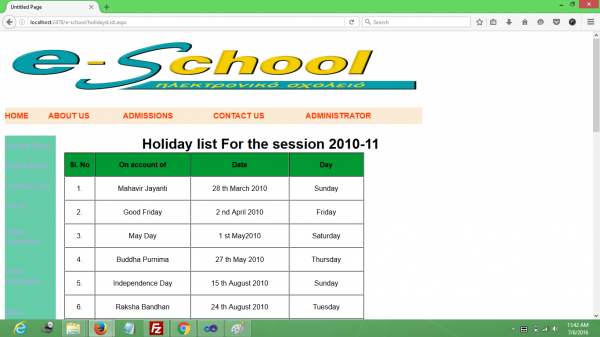
School Timings: Holiday details for years, starting time, lunch break, sports time..etc details are updated to software using this module.
List of forms in this software application
Admission form
Contact us
Edit marks
Edit attendance
Holiday list
Login
Registration
School staff
Notice.
User modules and function of E School Management System
We will implement the following functionalities in the ASP .NET E School Management System Project:
Software requirement to run this project
IDE TOOLS : Visual Studio, ReSharper, JetBrains Rider, MonoDevelop
Operating system Microsoft Windows, Linux, macOS
Visual Studio (or Visual Studio Code) Required for Main IDE for ASP.NET Core and ASP.NET Framework
.NET SDK Required to build and run ASP.NET Core projects
SQL Server (or other database) For storing application data
.NET Runtime For running ASP.NET Core applications
Web Browser For testing the application in development
Hardware requirement to run this project
Processor (CPU):
Intel Core i7 or better (or equivalent AMD Ryzen)
Multi-core processor (4+ cores recommended for optimal performance)
RAM:
16 GB or more (ideal for handling large projects, running multiple services, and testing)
Storage:
SSD with 50+ GB of free space (for faster performance with Visual Studio, .NET builds, and databases)
Operating System:
Windows 10 (64-bit) or Windows 11 for Visual Studio
For MacOS users, you can use Visual Studio for Mac or Visual Studio Code with the .NET SDK.
Linux users can also develop using VS Code with .NET Core.
How to install the project?
After you finish downloading the project, unzip the project file.
How to import database?
There is database named eschool.sql import it in your sqlserver and connect with your ide.
Why a download E School Management System project from kashipara?
Downloading the E School Management System project from Kashipara is a best choice for students, beginners, and developers looking for a reliable, well documented, and ready to use project in ASP .NET.
Top benifit to Download our project over other website:
- Our E School Management System Source Code in ASP .NET completly working. This project easy to understand and fully customizable as per your requriments.
- Free Download our E School Management System projects.
- Comprehensive Documentation:
- We provide project Synopsis
- E School Management System project Abstract in PDF and PPT formats download in reports.
- Detailed Project Report
- UML & Technical Diagrams Included:
- This project Ideal for Academic Projects Perfect for B.E., B.Tech, MCA, BCA, BSc CS, and IT students
- 100% Working Project – Tested and bug free.
- Developed for Learning & Research – A strong foundation for building advanced E School Management System applications
How to create diagram?
Creating diagrams like Class Diagrams, Use Case Diagrams, Entity–Relationship (ER) Diagrams, Data Flow Diagrams (DFD), and Sequence Diagrams is essential for designing and understanding software systems. Here’s a proper guide to help you get started with each type: