Features of the Wenben Text Editor project
We will implement the following feature in the Java Wenben Text Editor Project:
Introduction:
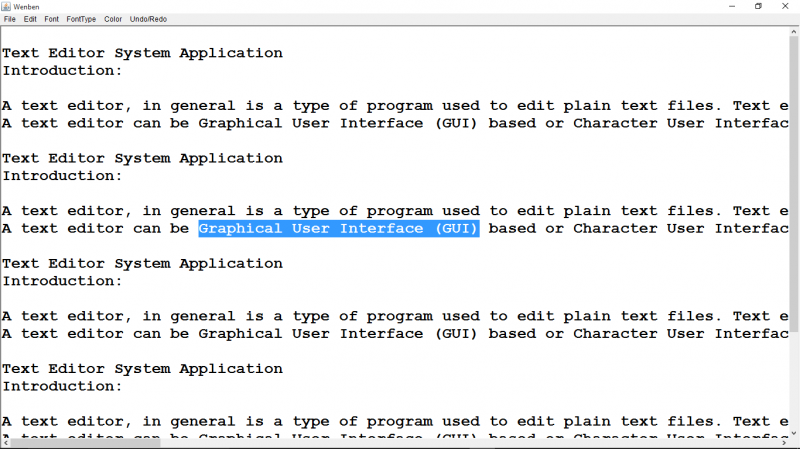
A text editor, in general is a type of program used to edit plain text files. Text editors are often provided with operating systems or systems of software development packages, and can be used to configure files and programming Languages source code. Various text editors are available in the market, e.g., vi editor and Ernacs editor in UNIX, Simple Text and TextEdit editor in Macintosh, Notepad in Microsoft Windows, and so on.
A text editor can be Graphical User Interface (GUI) based or Character User Interface (CUI) based. A GUI based application is always preferred over a CUI based one since we have to click with the help of mouse on the readymade command instead of typing them.
Notepad is the most common text editor used by almost all computer .It is used to create simple documents .It saves files in plain text format (ANCI text) and support only a few formatting options.
Existing system:
We cannot open or edit multiple text files at the same time as a text editor in general does not support multiple documents interfaces. Bulleted text cannot be inserted in text files. Notepad supports just two colors-Black and White (black as the text color and white as the background). We cannot take Print Preview of a document .We cannot view text with left, right, and center alignments simultaneously. The user has to go to the option in the various menus to any command since toolbars with shortcut commands are not available.
Proposed System:
The text editor allows the user to open multiple windows in the same application. With this text editor, users will be to create and edit simple text documents or documents with complex formatting and change font color, background color, and use bulleted text. Users can also use the shortcut command from user-friendly toolbar, along with many other options.
Hardware requirements:
HDD : 10 GB
CPU : Intel® Core TM i3-317U (1.8 GHz, 3 MB L3 cache)
RAM : 4 GB DDR3 Memory
Software requirements:
Programming language : Java
Operating system : Windows 10
User modules and function of Wenben Text Editor
We will implement the following functionalities in the Java Wenben Text Editor Project:
Software requirement to run this project
IDE : Eclipse, IntelliJ IDEA, NetBeans, Oracle JDeveloper, Visual Studio Code (VS Code), BlueJ, JDeveloper
Programming Languages and Frameworks : Java 20, Java 22
Database : MySQL, PostgreSQL, Oracle Database, MongoDB, Maria DB (depending on the project's data requirements)
Application Servers : Apache Tomcat, Jetty, or others depending on deployment needs
Hardware requirement to run this project
Processor : A multi-core processor ( Intel Core i5 or i7, AMD Ryzen 5 or 7) for faster compilation and running IDE smoothly.
RAM : Minimum requirements 8GB RAM is recommended for comfortable development. More RAM (16GB or higher) may be beneficial for larger projects or if running multiple applications simultaneously.
Storage : SSD for fast read/write, HDD
Operating System : Windows, macOS, Linux
How to install the project?
After you finish downloading the project, unzip the project file.
run the below commands in the command prompt:
javac TextEditor.java
java TextEditor
Why a download Wenben Text Editor project from kashipara?
Downloading the Wenben Text Editor project from Kashipara is a best choice for students, beginners, and developers looking for a reliable, well documented, and ready to use project in Java.
Top benifit to Download our project over other website:
- Our Wenben Text Editor Source Code in Java completly working. This project easy to understand and fully customizable as per your requriments.
- Free Download our Wenben Text Editor projects.
- Comprehensive Documentation:
- We provide project Synopsis
- Wenben Text Editor project Abstract in PDF and PPT formats download in reports.
- Detailed Project Report
- UML & Technical Diagrams Included:
- This project Ideal for Academic Projects Perfect for B.E., B.Tech, MCA, BCA, BSc CS, and IT students
- 100% Working Project – Tested and bug free.
- Developed for Learning & Research – A strong foundation for building advanced Wenben Text Editor applications
How to create diagram?
Creating diagrams like Class Diagrams, Use Case Diagrams, Entity–Relationship (ER) Diagrams, Data Flow Diagrams (DFD), and Sequence Diagrams is essential for designing and understanding software systems. Here’s a proper guide to help you get started with each type: